GETTING STARTED · WORKFLOWS / AGENTS
Turn a request into
a clear path.
Follow Alex’s equipment request from input to outcome. Discover where rules, tools, agents, and human decisions fit.
Chapter 1
Give the workflow a clear job
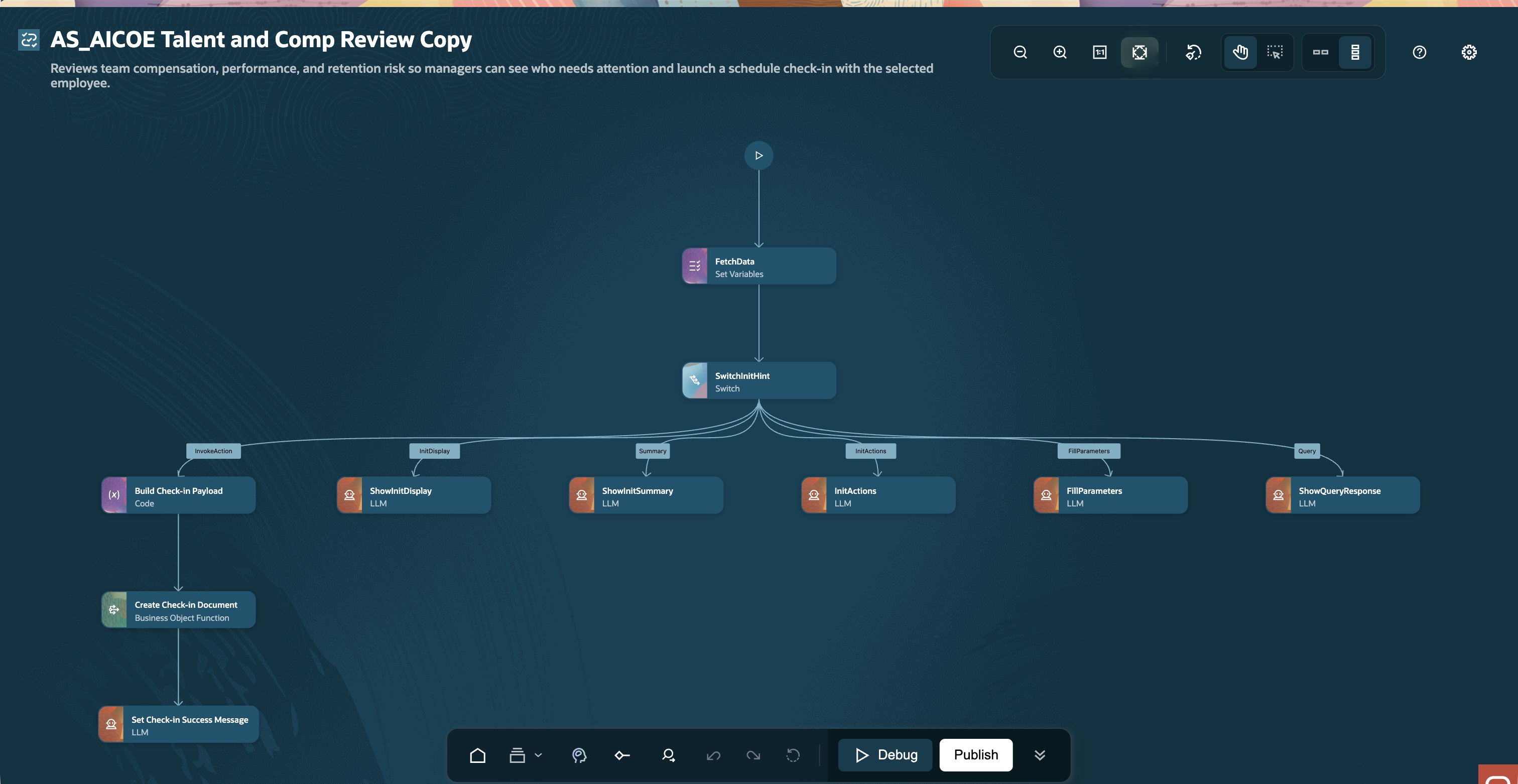
A workflow is a connected sequence of nodes. Each node performs a function and passes results to the next step. Conditions, loops, and branches shape the route.
Start with the input and the expected result. Here the input is an equipment request; the result is either a confirmed request, a question for Alex, or a decision for Sam.
Write down the ordinary process before choosing nodes. This keeps a workflow tied to a business purpose.
Oracle references: Create workflows
Chapter 2
Watch one request travel
First, walk through a complete example. A structured form already supplies named fields. A free-text request may need an AI step to interpret the message before those fields can be checked.
The example below illustrates the route. The outcomes are based on the scenario you select; they are not a live Oracle execution.
Walk through a request
Alex requests a laptop
- Receive request
- Read form fields
- Check details
- Look up equipment
- Check approval limit
- Confirm request
Receive request
Alex’s request enters the workflow.
Oracle references: Create workflows · CoE: Workflow agents
Chapter 3
Use rules and reasoning deliberately
A condition can compare a request amount with an approval limit. An agent or model can help interpret a description that arrives in different words. A tool can retrieve an equipment record.
A controlled route does not guarantee that every AI response is correct. Validate the values passed between steps and test the response the person receives.
Supervisor agents coordinate other agents dynamically. They are useful when work needs specialist reasoning or routing. You can also place agent-driven reasoning inside a structured workflow.
A small challenge
The request is already a structured form. Which step checks whether its amount is above the limit?
Choose an answer to explore the reasoning. You can try again.
Oracle references: Configure agents · Workflow nodes
Chapter 4
Choose the right node
A node is one step in the workflow. Pick it for the work that needs doing: reasoning, retrieving data, applying rules, controlling a route, or communicating a result.
Start with the few nodes your task needs. The library below lets you explore the full palette without having to memorize it.
All 27 node types shown in the reviewed 26D palette. Open a node for a use case and an original equipment-request example. Availability can vary by release.
AI
AgentUse a configured specialist.
Choose this when the agent’s instructions, topics, and tools should handle the task.
Try it in our story Alex asks which equipment the policy allows. Call the equipment agent with Alex’s question.
Oracle referenceLLMUse a large language model for text.
Use for a focused language task; validate extracted fields before acting.
Try it in our story Turn “I need a portable computer for Monday” into a proposed equipment request.
Oracle referenceMulti AgentCoordinate specialist agents.
Use when several specialisms need dynamic delegation; define each worker’s responsibility.
Try it in our story A supervisor routes equipment and training questions to different workers, then combines their answers.
Oracle referenceRAG Document ToolRetrieve relevant document evidence.
Use for document-grounded answers. Retrieval-augmented generation (RAG) supplies evidence to the model.
Try it in our story Find the equipment-policy passages that apply to Alex’s role.
Oracle referenceWorkflowCall another workflow.
Use when a separately managed process already provides the task and output you need.
Try it in our story Reuse an existing equipment-availability workflow from the onboarding process.
Oracle referenceCommunication
Send EmailSend a configured email.
Use for outbound email through the configured channel. Check recipients and approval requirements.
Try it in our story Notify Alex after the equipment request is confirmed.
Oracle referencePublish SignalEmit a business event.
Use to notify subscribers through a defined event and payload; it is different from emailing a person.
Try it in our story Publish a request-confirmed signal for a subscribed follow-up workflow.
Oracle referenceData
Business Object FunctionInvoke a supported Fusion business operation.
Use when the needed operation is exposed through a Fusion business object function. Check whether it reads or changes data.
Try it in our story Read the equipment request using its authorized record identifier.
Oracle referenceAI GuidanceRead or write contextual guidance.
Use for shared insights, summaries, recommendations, or alerts in the AI Guidance store, rather than for ordinary record updates.
Try it in our story Store a readiness recommendation against its supported business context, then retrieve it during a later review.
Oracle referenceDocument ProcessorExtract fields using a document schema.
Use when a document needs structured extraction. Validate the extracted values.
Try it in our story Read equipment type and requested date from an uploaded request document.
Oracle referenceExternal RESTCall an external HTTP API.
Use for a service exposed through REST; configure authentication, payload mapping, and error handling.
Try it in our story Ask an authorized equipment partner’s API for delivery availability.
Oracle referenceToolInvoke a supported utility or connector tool.
Choose the appropriate subtype: Deep Link, Connector, Chat Attachments Reader, Intent Change Indicator, or User Session.
Try it in our story Generate a deep link to the request, or read attachments from the current chat.
Oracle referenceVector DB ReaderRetrieve from a vector store.
Use for similarity-based retrieval from the configured store; inspect the returned evidence.
Try it in our story Find stored equipment-support notes related to Alex’s question.
Oracle referenceVector DB WriterWrite to a vector store.
Use in an authorized ingestion/update process. Decide what content may be stored and how it is maintained.
Try it in our story Index approved equipment-support content for a later retrieval workflow.
Oracle referenceLogic
CodeTransform or calculate values.
Use for deterministic transformations that need code; keep input and output contracts clear.
Try it in our story Calculate the total cost from quantity and unit price, then return a named result.
Oracle referenceSet VariablesKeep named values for later steps.
Use when downstream nodes need a stable value from an input, expression, or earlier output.
Try it in our story Store requestId, equipmentType, and approvalStatus for the rest of the route.
Oracle referencePolicy NodeEvaluate a configured policy model.
Use when business rules belong in a policy model rather than being repeated across conditions.
Try it in our story Apply a reusable equipment-eligibility policy to the request details.
Oracle referenceWorkflow Control
Human ApprovalPause for a person’s decision.
Use when a human must decide. Design the approve, reject, and follow-up paths.
Try it in our story Sam reviews an above-limit request with its amount and justification.
Oracle referenceReferenceCall a reusable block in this workflow.
Use to invoke a Reference Block, passing the parameters it expects.
Try it in our story Run the same request-validation block at two points with different input values.
Oracle referenceReference BlockDefine reusable logic in this workflow.
Use to define the shared block once; Reference nodes invoke it. A separate Workflow node calls another workflow.
Try it in our story Group the nodes that validate equipment type and needed-by date.
Oracle referenceIf ConditionChoose between two paths.
Use for a true/false decision with explicit outcomes.
Try it in our story If the amount exceeds the limit, ask Sam for approval; otherwise continue.
Oracle referenceFor LoopRepeat for a collection.
Use when you already have the list of things to process; handle an empty list too.
Try it in our story Check each equipment line in Alex’s request.
Oracle referenceParallelRun independent branches together.
Use when the branches do not depend on each other’s intermediate results.
Try it in our story Read training availability and laptop stock independently, then use both results.
Oracle referenceReturnEnd a branch and return a value.
Use when the caller needs a defined result; later work in that branch stops.
Try it in our story Return the validation result from a reusable block to the node that called it.
Oracle referenceSwitchChoose among named routes.
Use for several possible cases, and define a fallback for unmatched values.
Try it in our story Route a request to equipment, training, or building access based on its validated category.
Oracle referenceWaitPause for a configured interval.
Use for a timed pause. Waiting alone does not verify that the external work succeeded.
Try it in our story Give an asynchronous reservation service time to update before checking its status.
Oracle referenceWhile LoopRepeat while a condition remains true.
Use for condition-based repetition. Add a stop limit and an exit path for timeouts or errors.
Try it in our story Check a request’s processing status while it is pending, with a maximum attempt count.
Oracle referenceNames and categories follow Oracle’s 26D node list . Practical examples are illustrative, not delivered Oracle processes.
Oracle references: Workflow nodes
Chapter 5
Carry useful context forward
Variables are named values shared through the workflow: the requester, selected equipment, or approval result. An output specification describes the structure a step should return.
Give each step the information it needs. The approval step needs the request and its reason; the confirmation step needs the final decision.
Keep missing information visible. Asking Alex to clarify an incomplete request is a useful outcome, not a reason to invent the missing detail.
Oracle references: Expressions
Chapter 6
Choose what starts the work
A trigger describes the event or condition that starts a published workflow. The right trigger depends on how the business receives the work.
An email can start a workflow when a request arrives in its registered inbound account. A schedule starts recurring work. A signal starts work in response to a subscribed business event.
Choose an entry point
Where does the request arrive?
An email starts the workflow
A request arrives in the registered inbound account. The configured email trigger starts the published workflow.
Oracle references: Workflow triggers
Chapter 7
Check the alternative routes
Replay the example with missing details, an above-limit request, a pending approval, and a rejection. Each situation should produce a useful next step.
For a real build, test access, tool failures, and AI-generated outputs as well. Use the debugger and evaluation tools to inspect behavior before publishing.
The next guide gives Sam a workspace that brings these requests, decisions, and conversations together.
A small challenge
Alex leaves out the equipment type. What is a useful next step?
Choose an answer to explore the reasoning. You can try again.
Try it: find the first wrong result
Alex asks for a laptop. The final answer says one is available, but the inventory is empty. Open each checkpoint to investigate.
1. What did the lookup return?
Inspect the evidence
The lookup returned no records. That is a valid empty result. The next step must handle it instead of inventing availability.
2. Which branch ran?
Inspect the decision
The example took the “equipment found” route even though the lookup was empty. Fix the condition or its input mapping before rewriting the final answer.
3. How would you check the fix?
Replay meaningful scenarios
Save Run Profiles named Equipment found, Empty inventory, and Missing equipment type. Rerun them, inspect the route and node results, and check the final response. Remove temporary pins, mocks, and overrides before the full rerun.
Your checklist stays on this page and does not publish anything. Oracle publishing checklist
Fictional learning example. Read the Oracle guidance
Oracle references: Workflow debugging · Evaluation scenarios
TAKE IT WITH YOU
You have a starting point.
- Identify the inputs, nodes, connections, and outputs in a workflow.
- Explain where an agent helps and where a simple rule is enough.
- Follow approval, clarification, and rejection paths as well as the ordinary route.
Read further with Oracle
Concepts are summarized in plain language. Product availability and setup can vary by release and configuration.
When you are ready to build and test
Continue into the official learning paths when you want hands-on product setup.
Original learning stories & interactive examples © 2026 Sourabh Biharia.
Need a quick definition? Open the glossary