GETTING STARTED · AGENTIC APPLICATIONS
Give the team
one place to act.
Discover how an agentic application turns specialized agents and workflows into a useful experience for people.
Chapter 1
Start with the person using it
An agentic application combines specialized agents with knowledge, integrations, and controls to support a business outcome. Think about the decisions its users need to make.
Sam needs to see readiness, understand blockers, review suggested actions, and communicate the result. Those needs help us choose what the application should present.
The underlying agents and workflows still perform the work. The application brings their results and capabilities into a coherent workspace.
Oracle references: Agentic application overview
Chapter 2
Build the experience a piece at a time
Start with four foundational interaction areas: information displays, actionable insights, communications, and Ask Oracle advisors. The current 26D overview also includes Fusion Claw for outcome execution, covered in the next guide.
Start with the information display below. Add the other pieces, try a question, review the example request, and preview a message. Switch the person to see how context changes the view.
Build a small workspace
Sam’s first-day readiness workspace
Alex · Monday
A fictional request managed by Sam.
Equipment request
- Equipment
- Standard laptop
- Status
- Needs Sam’s review
- Training
- Booked
Understand the blocker
Review this request
Sam is authorized to review this fictional equipment request.
Welcome message
Choose a part above to explore the workspace.
Start with the display, then add the other parts.
Oracle references: Agentic application overview · Fusion Claw
Chapter 3
Understand the building blocks
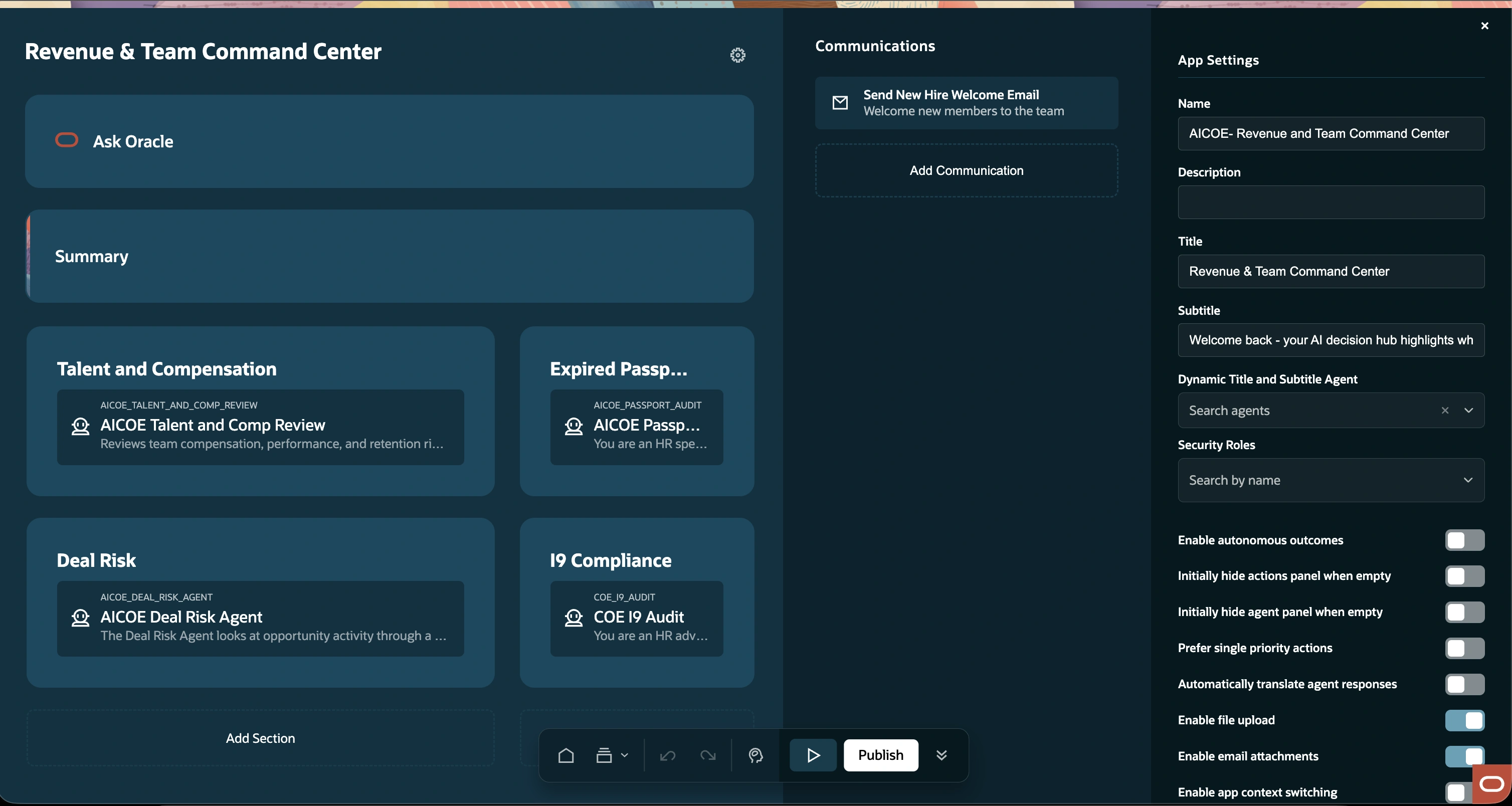
The four foundational interaction areas describe what users experience. The framework’s four building blocks are Agents, Widgets, Actions, and Communications: the work, its presentation, the follow-through, and the outreach.
Context, page structure, summary, and Ask Oracle connect those building blocks into a usable application. Explore each part, then choose a suitable widget for the information you need to show.
Explore the parts
Agents
Configured workflow agents retrieve and analyze information and produce the responses an application uses. Assign a suitable workflow to each section’s responsibility.
An equipment agent supplies readiness information; a training agent handles learning arrangements.
Oracle references: CoE: Application building blocks · Widget contracts
Chapter 4
Recognize the parts in an application
Connect the documented capabilities through our fictional readiness workspace. Summary, displays, advisors, actions, and communications each have a different job.
Choose a part below to see how it could help Sam. The example illustrates design choices; real labels and available components depend on the application configuration.
An illustrative workspace · What each part contributes
A readiness workspace
An original learning example using documented application capabilities; it is not a delivered Oracle application.
Summary
A configured summary brings contributing agents’ findings into an overview.
In our fictional readiness workspace, Sam sees which requests need attention.
Oracle references: Agentic application overview · Applications Builder
Chapter 5
Connect the experience to the work
An information display presents an agent’s result as a card, list, chart, or other supported pattern. The display does not perform the reasoning itself.
An action connects a decision to execution. The responsible agent and configured workflow carry out the necessary steps. Communications use templates to prepare consistent outbound messages.
In our example, reviewing equipment is a small workflow: identify the request, check the manager’s decision, update its status, and refresh the display.
Oracle references: CoE: Application actions · CoE: Communications
Chapter 6
Keep context and access separate
Context tells an agent what the current question is about: Alex’s request, the selected equipment, or a particular date. Passing it consistently helps keep answers relevant.
Access rules determine which information and operations the user may use. Selecting a person in a screen is not a grant of access to that person’s records.
The example treats Sam as an authorized manager of the two fictional requests. A real application must use the appropriate roles and business-data permissions.
Oracle references: Application stages and context · CoE: Identity and security
Chapter 7
Choose a display that helps a decision
Use a status card for one condition, a list for several requests, and a change list for numeric comparisons. Record and Multi Record displays can show request status fields.
A good starting application can be small: one useful display, a relevant advisor, and one clearly defined action. Add communications when the work needs follow-through.
A small challenge
Sam wants to compare approved-request counts, previously 8 and now 12. Which display fits?
Choose an answer to explore the reasoning. You can try again.
Oracle references: Widget contracts
Chapter 8
Test the experience from end to end
Test the question and the display, the action it suggests, the workflow it calls, and the refreshed result. Check that context stays with the request.
For communications, review the recipient and message content. For access, check both the application and the workflows it uses.
Some applications can also offer autonomous outcomes through Fusion Claw. The next guide explains that capability and when a larger, outcome-driven task is a good fit.
A small challenge
Sam selects Jordan. What should the advisor use?
Choose an answer to explore the reasoning. You can try again.
Oracle references: Application stages and context · Application-facing tests
TAKE IT WITH YOU
You have a starting point.
- Explain the roles of displays, advisors, actions, and communications.
- Trace an application action back to the work behind it.
- Distinguish business context from authorization.
Read further with Oracle
Concepts are summarized in plain language. Product availability and setup can vary by release and configuration.
- CoE: Fusion Agentic Apps learning path
- CoE: The Anatomy of an Agentic App
- CoE: Agentic Apps: Core Concepts
- Oracle: Overview of Agentic Applications
- Oracle: Build Agentic Applications
- Oracle: Widget types and configuration
- CoE: Using the Builder UI
- CoE: Configure agents and widgets
- CoE: Actions
- CoE: Communications
When you are ready to build and test
Continue into the official learning paths when you want hands-on product setup.
Original learning stories & interactive examples © 2026 Sourabh Biharia.
Need a quick definition? Open the glossary