GETTING STARTED · CLI
Describe the change.
Build with a clear plan.
Meet the tools that turn a business request into reviewable Fusion artifacts. Follow a small change from your workspace to a tested draft.
Chapter 1
Meet your building team
CLI means command-line interface: a way to work with AI Agent Studio through commands and files. A coding assistant can turn your request into a sequence of those operations. Fusion remains the place where the resulting workflows and applications run.
The AI Studio skill supplies the assistant with product-specific instructions, references, and CLI tooling. This development skill is different from the agents and reusable instructions configured inside your Fusion application.
You can give a business-level request to the assistant or use a known CLI command directly. The optional Fusion AI Studio extension adds visual editing in VS Code. Choose the combination that helps you understand and review the work.
Explore the parts
Coding assistant
The assistant interprets the request, proposes a plan, and uses the development skill and CLI to carry it out. Review the proposed scope before execution.
Sam asks: explain the current empty-result route and propose a small improvement.
Oracle references: CLI overview · CoE: AI Studio skill
Chapter 2
Prepare a place to work
Start with access to a suitable Fusion environment and the permissions your task needs. Install Node.js and the supported AI Studio skill; use VS Code and its Fusion extension if you want the visual editor. A coding assistant requires its own approved access or subscription.
Use Oracle’s repository and setup instructions for your release. Match the repository branch and extension to your Fusion release. Check the available branches rather than assuming that a newer documentation label implies a matching branch.
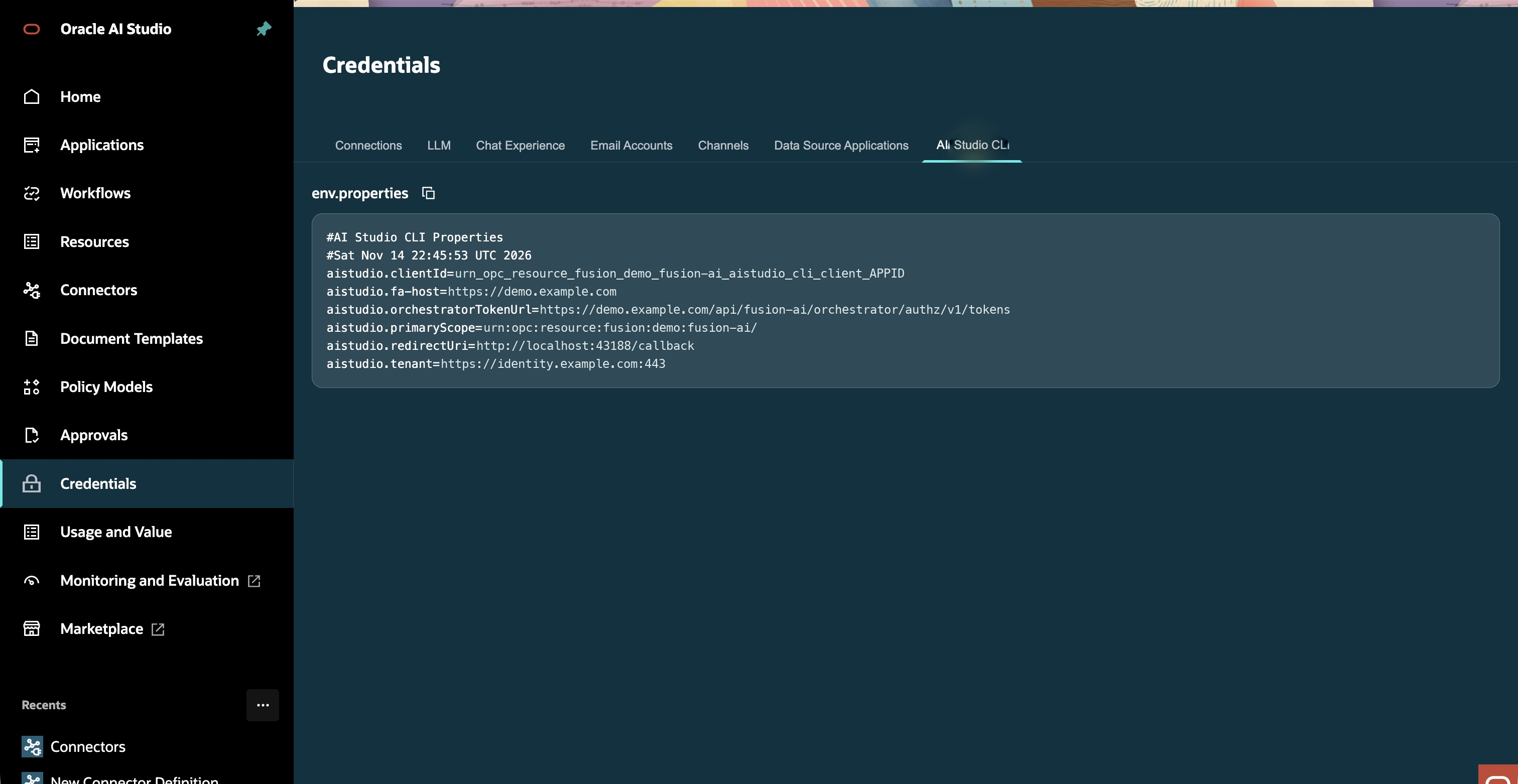
Open the project root so the assistant can find the skill and artifacts. Environment configuration and sign-in connect that workspace to Fusion. Keep connection details, credentials, reports, and debugger scratch files out of shared source control.
Builder’s first-session checklist
- Confirm the target Fusion release, environment access, and required permissions.
- Get the matching branch of Oracle’s Fusion AI Studio repository using the linked installation guide.
- Check that Node.js is available. Install the matching Fusion VS Code extension if you will use its visual editor.
- Open the workspace root containing
.agents/skills/aistudio/in your editor and coding assistant. - Follow the release-matched CLI enablement and authentication instructions. Keep
env.propertiesprivate and excluded from Git. - Ask the assistant to inspect the workspace and explain the available artifacts without changing or running them.
- Select one artifact and review its identity, dependencies, and intended DRAFT or PUBLISHED version before fetching or editing.
The documented command pattern, run from the project root, is:
node .agents/skills/aistudio/scripts/aistudio.js <command> [options]
Replace the placeholders with a supported operation from your installed release. These pages do not install tools, authenticate, or run commands.
Oracle references: CLI prerequisites · CoE: AI Studio skill
Chapter 3
Know what you are changing
For existing work, fetch the intended artifact and its dependencies. Check its identity and whether you selected DRAFT or PUBLISHED. Similar names do not guarantee that you have the same artifact or version.
Local files give you something to inspect, compare, and version. In a traditional workspace, workflows and applications live under src, tests under test, and generated evidence under test-reports. App-package workspaces use a different module-based layout.
A panel may depend on a workflow, which may depend on business objects or other artifacts. Ask the assistant to explain those relationships before changing one piece. Compare local changes with server changes before synchronizing.
Explore the parts
Local file
An editable artifact on your machine. You can review and validate it before deciding how it should interact with the server.
Sam reviews a proposed response change. Runtime tests have not yet been run.
Oracle references: CoE: AI Studio skill · CoE: CLI development lifecycle
Chapter 4
Ask for one useful change
Sam’s request is specific: when no equipment is found, explain the next step without inventing availability. Existing successful lookups should keep working. This gives the builder a clear change and a clear regression to check.
A useful request names the goal, the artifact, the information it may use, expected behavior, exceptions, and how completion will be checked. Let the assistant inspect real tool contracts; do not guess business-object names, fields, or record IDs.
Try changing the choices below. The example prompt is a starting point you can review and adapt. It stays in this browser and does not execute anything.
Shape a useful request
What should the builder change?
Inspect the existing equipment workflow and propose a plan to improve its empty-inventory response. Use verified tool contracts, preserve the successful lookup route, and identify the tests needed. Do not change files, save a draft, or run tests yet.
Use your own artifact name and verified contracts. This fictional example does not assume a particular Oracle equipment business object exists.
Oracle references: CoE: Describe a focused change
Chapter 5
Build, validate, and investigate
Review the proposed change before it grows. A small edit should leave a small, understandable difference: the changed route, its response, and any affected tests. Keep unrelated improvements for a separate pass.
Validation checks the artifact’s structure and configuration. Passing validation is useful, but it does not show that a live service responds or that Alex receives a correct answer. A trial run lets you observe behavior; a test checks it against an expectation.
When something looks wrong, ask which nodes ran and what each returned. The debugger can help isolate a step with pinned output or temporary overrides. After investigating, check the ordinary route again without those temporary aids.
Explore the parts
Validate
Validation finds configuration and structure problems supported by the validator. It is one check in the development cycle.
A valid no-results branch could still contain an unhelpful response.
Oracle references: CoE: Run, debug, and release
Chapter 6
Prove what changed and what stayed
Test the empty result Sam asked about, an ordinary successful lookup, and a request missing required details. For each case, name the expected route and the answer a person should receive. ATLAS helps maintain those scenarios as the workflow changes.
Be explicit about where work may happen. Local authoring can create files without updating Fusion, but runtime testing can require a server DRAFT. In the documented coding-assistant lifecycle, material edits can trigger testing that saves one DRAFT.
If you request local-only work, expect runtime verification to remain a later step. The closing summary should say which files changed, which checks ran, which version was tested, and what is still pending.
A small challenge
The workflow validates. What evidence is still useful?
Choose an answer to explore the reasoning. You can try again.
Oracle references: CoE: CLI development lifecycle · ATLAS overview
Chapter 7
Move a reviewed version forward
Saving a DRAFT makes the reviewed definition available in Studio. Check for a newer server draft before replacing it, and inspect the saved result. A draft save and publication are separate actions.
In the documented AI Studio skill flow, publish workflows through Studio or CI/CD. Some other artifact types support explicit CLI publication; that does not make workflow publication a general CLI operation.
After release, verify the deployed version and its connections in the target environment. Keep the source revision and test evidence together. Sam’s change is complete when the new response works and the earlier behavior still passes.
Oracle references: CoE: Run, debug, and release
TAKE IT WITH YOU
You have a starting point.
- Distinguish the CLI, coding assistant, development skill, extension, and Fusion runtime.
- Write a focused request with verified data contracts and useful completion criteria.
- Explain the difference between local edits, validation, runtime tests, a draft save, and publication.
Read further with Oracle
Concepts are summarized in plain language. Product availability and setup can vary by release and configuration.
- CoE: CLI learning path
- Oracle, chapter 14: CLI overview
- Oracle: CLI prerequisites
- Oracle GitHub: Fusion AI Studio
- Oracle GitHub: installation and VS Code setup
- CoE: Inside the AI Studio skill
- CoE: Development lifecycle
- CoE: Write a request that builds the right thing
- CoE: Work in VS Code
- CoE: Run, debug, and release
- CoE: OAuth article with historical setup notice
When you are ready to build and test
Continue into the official learning paths when you want hands-on product setup.
Original learning stories & interactive examples © 2026 Sourabh Biharia.
Need a quick definition? Open the glossary