Before
A model calculates the shortage and stock-sufficiency flag from requested and available quantities.
LEARNING / PRACTICAL COLLECTIONS
The quantity calculation has one correct answer. Move the fixed rule into reviewed deterministic logic and reserve natural-language generation for the explanation, if an explanation is needed at all.
Fictional learning examples, based on public 26D references. These exercises run in your browser and do not connect to Fusion. The configuration checkpoints are planning guidance, not a verified end-to-end Fusion lab.
P03 / 26D REFERENCE
Test one focused hypothesis while protecting correctness.
8-12 min reading; experiments vary · Time estimate, excluding access and setup.
Start with: Turn messy input into a dependable request.
THE HYPOTHESIS
A model calculates the shortage and stock-sufficiency flag from requested and available quantities.
A validated transformation calculates the number and flag; an optional separate response step explains the structured facts.
Given requested=2 and available=1, calculate the shortage and say whether stock is sufficient.
// Inputs must already be validated whole numbers. const shortage = Math.max(0, requested - available); const stockSufficient = shortage === 0; // Preserve these facts in any later explanation.
MEASUREMENT WORKSHEET
All results for this experiment are currently unmeasured. You can use the calculator with your own numbers; they remain in this page and are not saved or verified.
RECOGNIZE THE CONTROLS
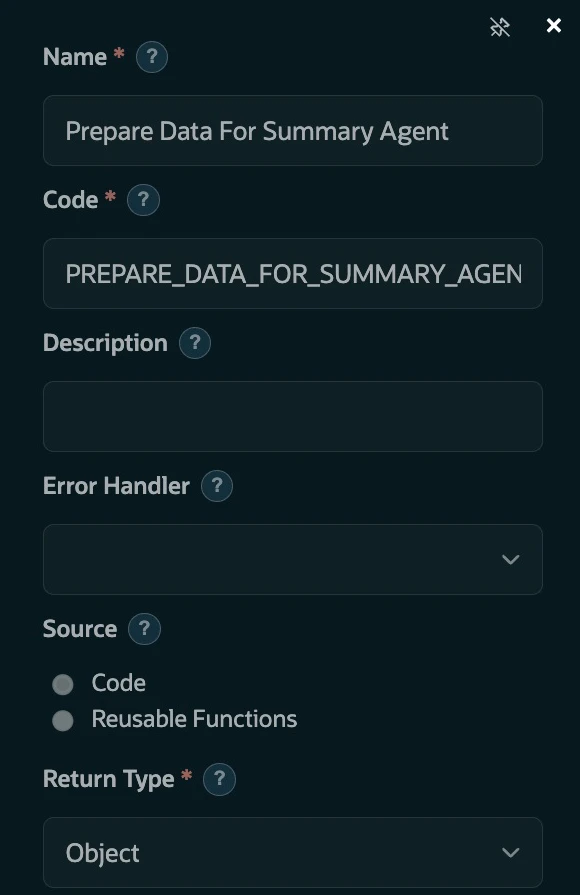
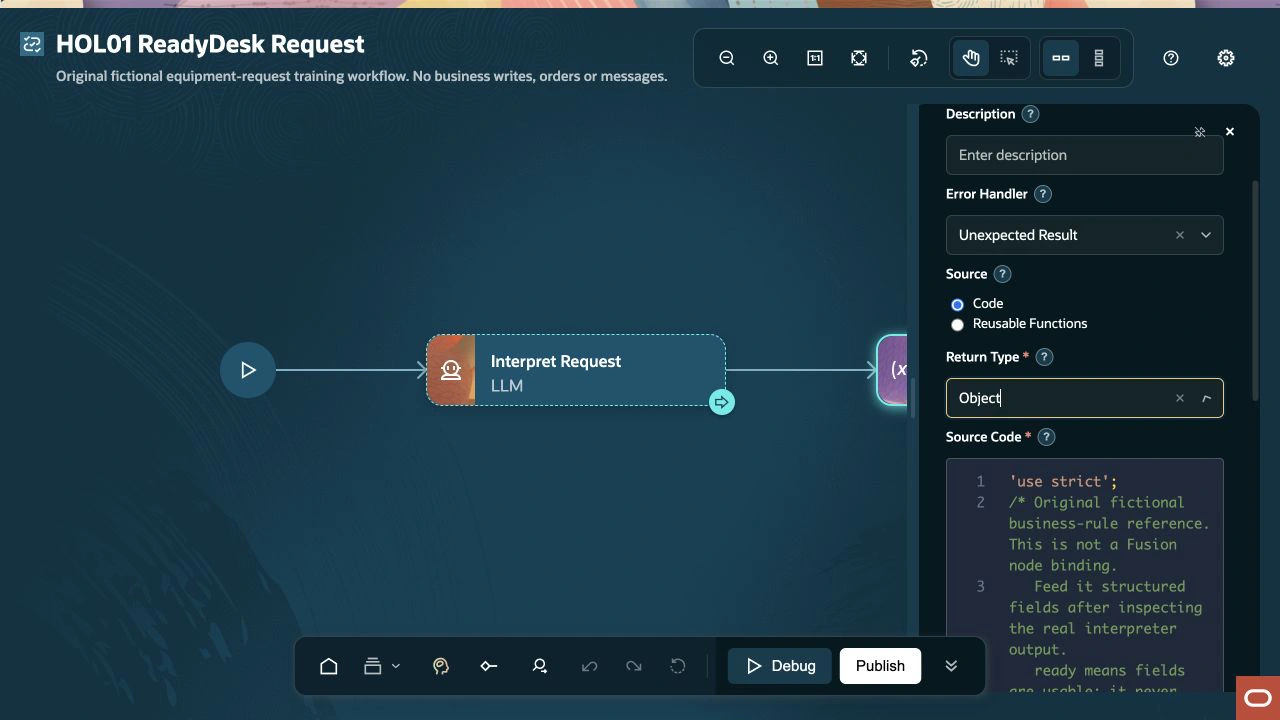
Actual UI controls from other example artifacts. These images do not show the fictional Starter Ready build running. Visible configuration is not execution evidence; labels and availability vary by release and permissions.
 Enlarge screenshot
A close view of actual Code node properties. This node is configured with an Object return type; its complete output contract is not shown.
Look for: Match the configured return type to the object expected by the next step. This is configuration, not a validated transformation result.
 Enlarge screenshot
The actual validation output wraps its business object under result. This is the separate ReadyDesk rehearsal, not a universal node-output contract.
Look for: Find result.status and compare the actual wrapper with the binding you are using.
 Enlarge screenshot
Object is selected in the actual ReadyDesk validation node. The exact wrapper is shown separately in its debugger result.
Look for: Compare configured return type with observed runtime structure.
FOLLOW THROUGH
Publish an honest before/after case only if the revised design passes quality and safety gates. A negative or inconclusive result is publishable learning too.
CHECK YOUR WORK
Use this checklist for your own review. It is not an automated test result.
READ THE SOURCE
Product facts come from public Oracle sources. Sample rules, data, tests and experiments are original teaching examples.
The browser calculation is an illustration, not a drop-in Fusion Code node configuration. Confirm the editor language and supported runtime before building.
These are optimization hypotheses. Improvements need measurement, and correctness remains the acceptance gate.