Before
The initial display enters the full question route and repeats avoidable lookups.
LEARNING / PRACTICAL COLLECTIONS
Opening the page and answering a detailed question are different jobs. Test a minimal display path while keeping the full question path available when a visitor actually asks.
Fictional learning examples, based on public 26D references. These exercises run in your browser and do not connect to Fusion. The configuration checkpoints are planning guidance, not a verified end-to-end Fusion lab.
P06 / 26D REFERENCE
Test one focused hypothesis while protecting correctness.
8-12 min reading; experiments vary · Time estimate, excluding access and setup.
Start with: Give the readiness workflow a small application, The application does too much when it opens.
THE HYPOTHESIS
The initial display enters the full question route and repeats avoidable lookups.
Route InitDisplay to a small display response using the documented oraInfoDisplay structure. Keep this sample read-only by design. Query retains the required question logic.
Every message stage → full question workflow
InitDisplay → small oraInfoDisplay response, read-only in this sample Query → relevant question workflow Unsupported stage → controlled response; no accidental action
MEASUREMENT WORKSHEET
All results for this experiment are currently unmeasured. You can use the calculator with your own numbers; they remain in this page and are not saved or verified.
RECOGNIZE THE CONTROLS
Actual UI controls from other example artifacts. These images do not show the fictional Starter Ready build running. Visible configuration is not execution evidence; labels and availability vary by release and permissions.
 Enlarge screenshot
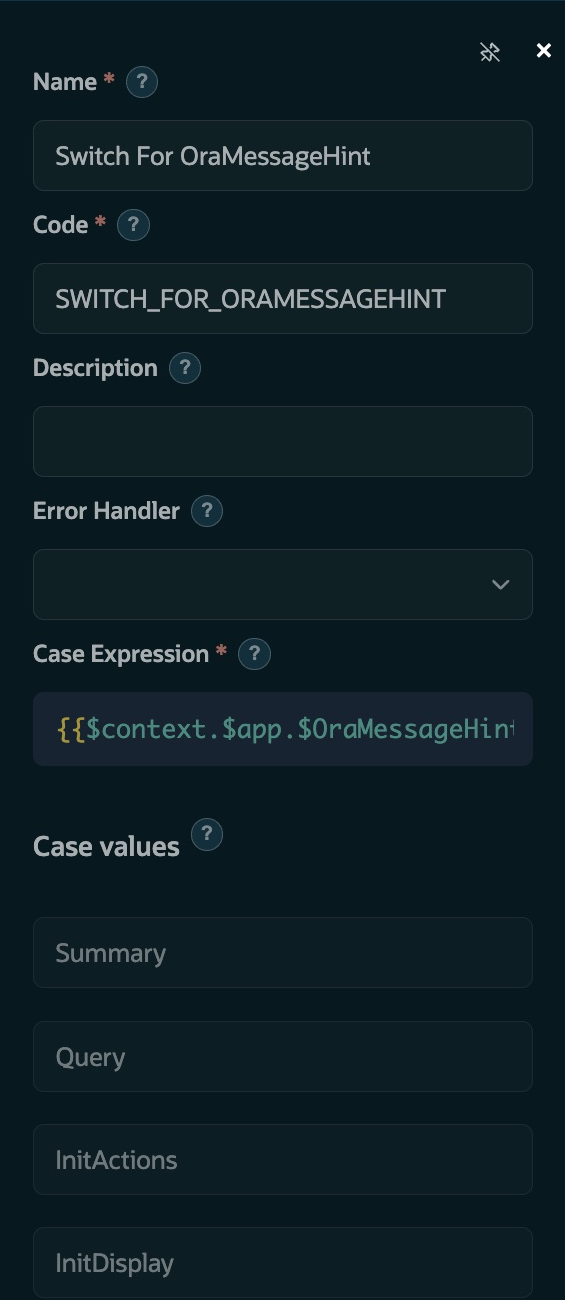
Close view of an existing Switch configuration. The case list includes application stages such as Summary, Query, InitActions and InitDisplay. The expression field is clipped; no evaluated branch or widget output is shown.
Look for: Find Case Expression and the named stage values. Use the official reference for the complete OraMessageHint expression.
FOLLOW THROUGH
Publish an honest before/after case only if the revised design passes quality and safety gates. A negative or inconclusive result is publishable learning too.
CHECK YOUR WORK
Use this checklist for your own review. It is not an automated test result.
READ THE SOURCE
Product facts come from public Oracle sources. Sample rules, data, tests and experiments are original teaching examples.