LEARNING / PRACTICAL COLLECTIONS
Give the readiness workflow a small application
A useful application does different work when it opens and when a person asks a question. Give Alex a compact readiness view, then let a question invoke the relevant workflow path. Make loading the page a deliberate operation, not a full business action.
Fictional learning examples, based on public 26D references. These exercises run in your browser and do not connect to Fusion. The configuration checkpoints are planning guidance, not a verified end-to-end Fusion lab.
G06 / 26D REFERENCE
What you’ll take away
Connect application request stages to the right workflow branches and validate a minimal supported display.
45-60 min · Time estimate, excluding access and setup.
Start with: Turn messy input into a dependable request, Compose one reusable stock check.
TRY THE IDEA
A small browser exercise
Explore the sample behavior before considering a sandbox build.
Choose an option to explore the result.
This illustrates a proposed routing design. Actual stage behavior and the widget contract need validation in the target app.
THE CONTRACT
Worked example
Initial display
[
  "Laptop: one additional device needed",
  "Monitor: review pending"
]
Question
What still needs attention?
Required answer facts
[
  "Laptop shortage",
  "Second-monitor review is pending"
]
Widget boundary
Only the business facts are illustrated here. InitDisplay requires the documented oraInfoDisplay structure; a Card uses cardWidget with widget-specific config. No runnable widget payload is supplied or claimed tested.
RECOGNIZE THE CONTROLS
Inside AI Agent Studio
Actual UI controls from other example artifacts. These images do not show the fictional Starter Ready build running. Visible configuration is not execution evidence; labels and availability vary by release and permissions.
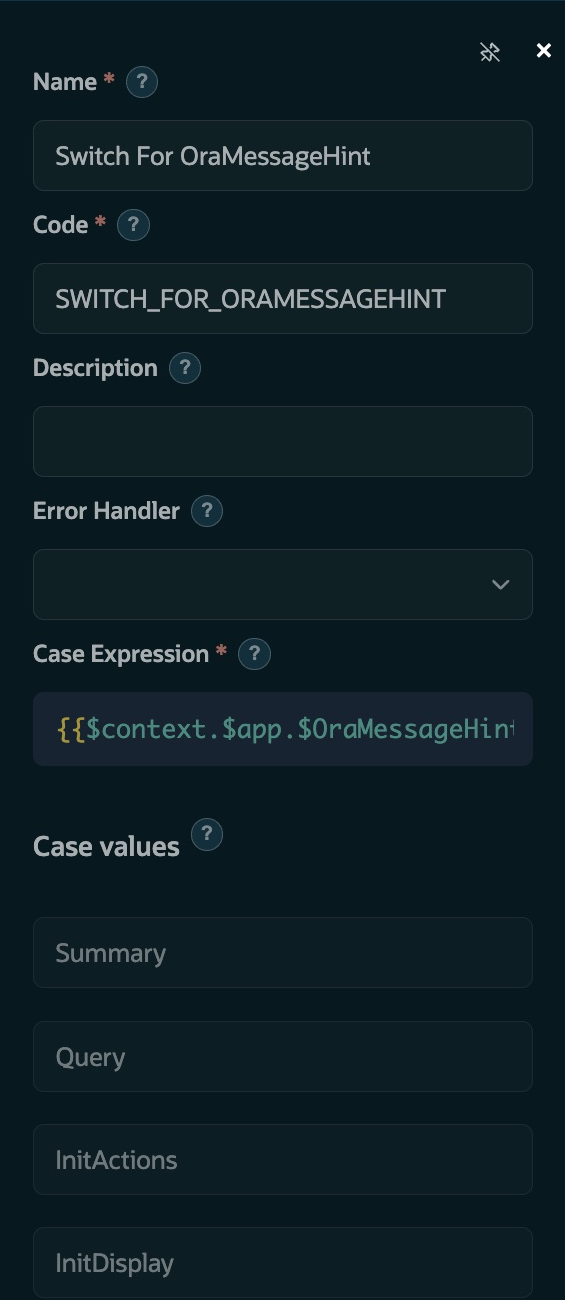
Inspect the application-stage Switch
 Enlarge screenshot
Close view of an existing Switch configuration. The case list includes application stages such as Summary, Query, InitActions and InitDisplay. The expression field is clipped; no evaluated branch or widget output is shown.
Look for: Find Case Expression and the named stage values. Use the official reference for the complete OraMessageHint expression.
BUILD CHECKPOINTS
Plan the sandbox version
- Sketch one readiness view and one question path before choosing widgets.
- Define a stage-to-behavior table using the documented OraMessageHint values. Use Query for the question path; verify the chosen initialization/display stage in the actual app.
- Keep initial display work small and read-only. Validate application context separately from user-entered text.
- For the documented InitDisplay stage, plan one or more oraInfoDisplay blocks. A Card example uses patternId cardWidget and its own config contract. A plain user-facing Query answer is a different response path. Exact bindings and payloads still need target validation.
- Test page initialization, a follow-up question, empty data and an action-stage request independently.
Expected outcome
The initial view and question response agree. No initialization request places an order or silently starts an approval.
CHECK YOUR WORK
What needs to hold true?
Use this checklist for your own review. It is not an automated test result.
Sample policy, catalog and test inputs (JSON)
Before working in a sandbox
- Complete G01 and G03; Agentic Applications guide.
- Application-edit permission and the required exposed, published workflow in a sandbox.
This browser exercise uses fictional inputs. Before implementing the configuration in Fusion, validate the node settings, bindings, permissions and expected results in your authorized non-production environment.
READ THE SOURCE
Official references
Product facts come from public Oracle sources. Sample rules, data, tests and experiments are original teaching examples.
- Create and Enable Workflows for Apps Ch. 8 · Release 26D
- Widgets in Agentic Applications Ch. 8 · Release 26D
Widget types have distinct contracts. Verify the selected type’s patternId and configuration in the target release.
- Application workflow best practices Ch. 8 · Release 26D
- Application variables Ch. 8 · Release 26D