LEARNING / PRACTICAL COLLECTIONS
Compose one reusable stock check
Alex needs the same stock check in two places. Copying the logic creates two things to maintain. Define one small reusable component, give it a clear contract, and test what the caller actually receives.
Fictional learning examples, based on public 26D references. These exercises run in your browser and do not connect to Fusion. The configuration checkpoints are planning guidance, not a verified end-to-end Fusion lab.
G03 / 26D REFERENCE
What you’ll take away
Choose a component boundary and verify the input and output handoff without confusing reuse with a new execution mode.
30-45 min · Time estimate, excluding access and setup.
Start with: Turn messy input into a dependable request.
TRY THE IDEA
A small browser exercise
Explore the sample behavior before considering a sandbox build.
THE CONTRACT
Worked example
Child input
{
  "item": "laptop",
  "requested": 2,
  "available": 1
}
Business result
{
  "stockSufficient": false,
  "reason": "1 additional laptop is needed."
}
Two callers
[
  "Request check",
  "Readiness summary"
]
Contract boundary
This is the proposed business result, not a claimed Oracle node response envelope. The outer flow combines stock and review status.
RECOGNIZE THE CONTROLS
Inside AI Agent Studio
Actual UI controls from other example artifacts. These images do not show the fictional Starter Ready build running. Visible configuration is not execution evidence; labels and availability vary by release and permissions.
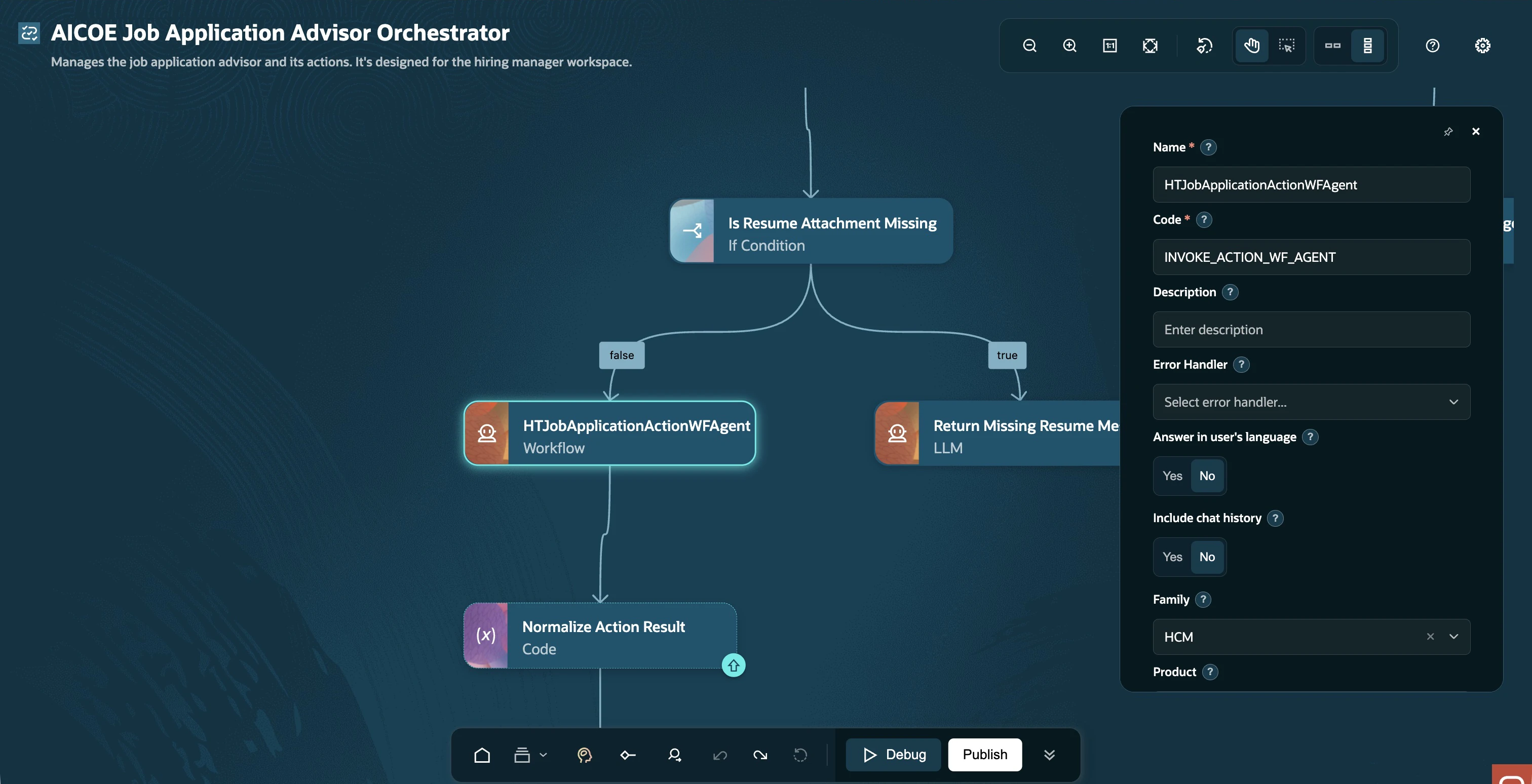
Inspect a child workflow node
 Enlarge screenshot
A Workflow node is selected beside its general properties. The referenced child selection, complete input mappings and returned result are below the visible area or not shown.
Look for: Recognize the Workflow node type. Follow the composition reference for selecting a published child and exposing its inputs.
Bind the published child workflow
 Enlarge screenshot
A separate fictional stock-check caller selects its published child and binds the caller message. This actual configuration supplements the authored Guided Build; it is not the Starter Ready artifact.
Look for: Locate the selected child and current-message binding.
Map the real child result
 Enlarge screenshot
The tested child returns its business object under output. The generated result binding returned null and was corrected after inspecting actual runtime output.
Look for: Compare the return expression with the actual child envelope.
Inspect the real caller result
 Enlarge screenshot
The separate stock-check caller returned stockSufficient=false for requested=2 and available=1. Sufficient-stock and zero-quantity inputs were also checked. No business records are changed.
Look for: Separate a stock comparison from approval, reservation or ordering.
BUILD CHECKPOINTS
Plan the sandbox version
- Define the child contract: item, requested quantity and available quantity enter; stock sufficiency and reason leave. This child does not determine approval or overall request readiness.
- Plan the deterministic child first, with no approval, wait or external write. Publish only in the approved sandbox after its isolated tests pass.
- Create two thin callers, a direct request path and a readiness-summary path, using a Workflow node to call the published child workflow described by the CoE pattern. Inspect the target release’s invocation options before configuring it.
- For the cited CoE workflow-call pattern, expose the child inputs through webhook trigger variables so the caller can map them. Confirm this setup against the target release; input bindings are not visible in the example screenshot.
- If adapting this pattern to a worker agent instead, use the Agent node with an eligible published worker. Oracle distinguishes reusable agents created in the Agents tab from agents created inside a workflow, which remain local to that workflow.
- Inspect the real invocation result and map the business payload rather than assuming its envelope.
- Change an internal reason message, retest both callers, then intentionally test an incompatible output change to demonstrate contract risk.
Expected outcome
Both callers agree on stock sufficiency. A broken contract is detected by tests rather than quietly shown to a visitor.
CHECK YOUR WORK
What needs to hold true?
Use this checklist for your own review. It is not an automated test result.
Sample policy, catalog and test inputs (JSON)
Before working in a sandbox
- Complete G01 and understand published artifacts.
- Sandbox publication permission for the reusable component; no Human Approval or Wait inside the proposed child.
Do not substitute a Reference Block for a separately invoked published workflow, or assume their scope/lifecycle is identical. Embedding restrictions and invocation bindings must be rechecked in 26D before a hands-on recipe is published.
READ THE SOURCE
Official references
Product facts come from public Oracle sources. Sample rules, data, tests and experiments are original teaching examples.
- Composing AI solutions Oracle Fusion CoE · 2026-03-04
The article excludes embedded workflows with Human Approval or Wait. The sample keeps approval in the outer flow; verify the target release’s supported composition.
- Create Workflows Ch. 7 · Release 26D
- Inspect Node Results Ch. 10 · Release 26D
- Can I use any agent in my workflow? Ch. 19 · Release 26D
This is an artifact-reuse boundary, not a guarantee that every eligible artifact is selectable in every environment.